Staying safe online is becoming harder all the time. As a result, scammers and hackers are growing wealthy at our expense. But you really don’t have to feel helpless.
On this page you’ll find free advice from a professionally trained IT and cybersecurity professional recently retired, but very much up to date.
The Dirty Dozen
Twelve key areas to focus on. Dip in and out as you like but covering all twelve gives you the clearest picture of the risks and the strongest protection for you, your family, and your friends.
1. Why older adults are targeted
Older adults are prime targets for scammers due to factors like lifetime savings, trusting natures, fixed routines, and less frequent exposure to digital threats. Scammers exploit politeness many seniors hesitate to hang up or say no and isolation, using emotional tactics like pretending to be family or officials.
Limited tech familiarity means missing phishing cues, while valuable assets like pensions and homes attract financial predators. In 2025, UK reports showed seniors losing millions of pounds to scams yearly, often via phone or email.
Protect yourself by discussing any suspicions with family and verifying claims independently. Stay vigilant: if it feels off, it probably is.
2. Common scam types
Key scams to watch for:
Phone scams calls with “spoofed caller ID” (the number looks like your bank’s) claiming problems with your account.
Text scams urgent links to fake sites.
Email phishing links leading to fake, malicious web pages promising bogus prizes or refunds.
Tech support fraud fake calls from “Microsoft” or pop-ups in your browser claiming your computer is infected and demanding remote access.
Romance scams fake online relationships that eventually request money.
Grandparent scams fraudsters posing as a grandchild in an emergency needing urgent cash.
These scams evolve constantly 2026 has seen a significant rise in AI voice cloning. Scammers always pressure quick action.
Real organisations never demand instant payment via gift cards, wire transfer, or Bitcoin. Report scams to Action Fraud UK: 0300 123 2040.
3. Warning signs of a scam
Watch for these red flags:
Urgency “Act now or lose access!”
Secrecy “Don’t tell your family.”
Requests for passwords or one-time passcodes (OTPs).
Unusual payment methods gift cards or cryptocurrency.
“Too good to be true” offers.
Poor grammar or spelling.
Unsolicited contacts or spoofed numbers.
Emotional pressure fear or greed is a common tactic. Example: “Your account’s been hacked send the code now.”
Legitimate firms use official channels. Hang up and check via a number you already know. Use Truecaller for number verification. Trust your instincts if you feel rushed or pressured into secrecy, it’s almost certainly a scam.
4. Protecting personal information
Safeguard your name, address, date of birth, bank details, passwords, and NHS number. Never share these via unsolicited calls, texts, or emails.
Scammers use “verify your details” tricks to fish for information. Use privacy settings on social media lock your profile and avoid posting your routines or location. Shred post containing personal data.
Register with the TPS (Telephone Preference Service) to reduce cold calls. If you suspect a breach, freeze your credit file via Experian or Equifax.
Principle: share personal information only with trusted, verified contacts. A family member can help you audit what you’ve shared online.
5. Safe password and account practices
Scammers use “verify your details” tricks to extract your information piece by piece. Here’s how it typically unfolds:
Them: For security, can you tell me the first line of your address and postcode?
You: 52 Festive Road, London L12 6DB
Them: Thank you, Mr Ben. And your date of birth?
You: 12 October 1952
Them: And the 1st and 4th digits of your PIN?
You: 8 and 6
Them: Oh, sorry that’s not what I have. Can you give me the 2nd and 3rd digits?
You have now handed over your full PIN (8, 2, 1, 6). Worse, any time you feel uneasy, they can repeat that information back to you and you’ll feel reassured. Your bank will NEVER call you out of the blue. If you receive an unexpected call, hang up and call your bank using the number on their official website or the back of your card.
For passwords: use 12 or more characters with a mix of letters, numbers, and symbols (for example: BlueSky2026!Rain). Never reuse passwords across different accounts. Use a free password manager like Bitwarden.
Enable two-factor authentication (2FA) also called MFA using an authenticator app rather than SMS wherever possible. Change the default passwords on your router and other devices. Log out after every session, especially when using public Wi-Fi.
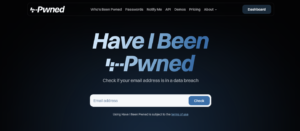
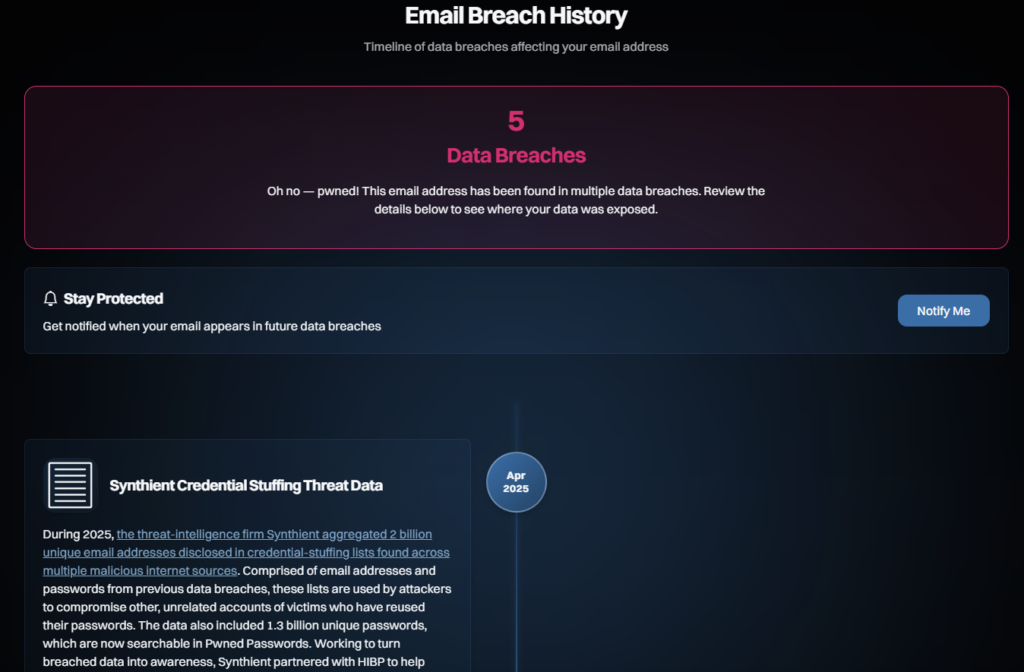
Check whether your email address has appeared in a data breach using Have I Been Pwned it’s free and takes seconds.
Visit haveibeenpwned.com, enter your email address, and click Check. It’s free and takes seconds.If breaches are found, the site explains each one in detail. Locate your login for the relevant site, sign in, and change your password immediately.
6. Safe phone and text use
Be aware of caller ID spoofing the number displayed can look completely legitimate but isn’t. Never click links in unexpected texts; delete them without responding. Voicemail scams play panic-inducing messages to prompt a call-back.
Block spam using your phone’s built-in settings or apps like Hiya. UK scams via WhatsApp rose 20% in 2025. Forward suspicious texts to 7726 to report them. Use “Do Not Disturb” to screen unknown numbers.
Golden rule: hang up first, then call back safely using a number from the organisation’s official website or a recent statement.
7. Safe email and web browsing
Never respond to unsolicited contacts. Verify everything by calling official numbers found independently not numbers given to you in the message. Always check for HTTPS and the padlock icon in your browser’s address bar before entering any personal details.
Be cautious of emails promising refunds, prizes, or urgent account warnings. If a link looks suspicious, do not click it go directly to the website by typing the address yourself.
8. Online banking and shopping safety
Always use your bank’s official app or website never follow links from emails. Check for HTTPS and the padlock icon. Consider using a virtual or prepaid card for online shopping so your main account details are never exposed.
Set transaction limits on your account.
Spot fake urgency “limited time deal” pressure is a scam tactic.
Review your statements weekly.
Enable transaction alerts via your banking app.
Avoid using public Wi-Fi for banking or use a VPN (the Opera browser includes one free).
Shop only at reputable retailers; avoid pop-up or unfamiliar sites.
In 2025, losses to online banking fraud among older adults exceeded £100 million in the UK alone.
9. Social media and friendship scams
Fake profiles use stolen photos, build trust quickly, then request money for an “emergency.” These are common on Facebook and Instagram. Set your privacy to “friends only” and be cautious about accepting requests from people you don’t know.
You can verify a profile photo by doing a reverse image search via Google Images. Never send money to someone you’ve only met online. If in doubt, request a video call to verify though scammers can fake these too.
Real relationships never demand secrecy or money. If someone you’ve met online asks for both, it’s a scam.
10. Device and software security
Keep your operating system and all apps updated enable automatic updates if you can. Install a reputable antivirus such as Comodo (free). Use screen locks, PINs, or biometrics.
Limit app permissions, avoid “free” software downloads from unknown sources, and restart your devices weekly. Only install apps from the Apple App Store or Google Play Store. Enable remote wipe in case your device is lost or stolen. Scan for threats at least quarterly.
11. What to do if something feels wrong
Stop. Don’t click, pay, or share anything further.
Verify. Contact the organisation via their official channels not any number given to you by the caller.
Don’t respond. Responding confirms to scammers that your contact details are active.
Tell someone. Talk to a trusted family member or friend.
Report it. Contact Action Fraud online or by phone.
Preserve evidence. Take screenshots before deleting anything.
Protect your accounts. Freeze accounts if money may be at risk.
12. Recovering after a scam
Contact your bank immediately they may be able to reverse the transaction. Change all your passwords. Check your credit report (your Statutory Credit Report is available free of charge). Notify the police and Action Fraud, and preserve all evidence.
Get support from the Victim Support helpline. Monitor your accounts closely for at least six months. For identity theft, seek professional help. Recovery is possible but speed matters.
About the author
Steve Richards spent 18 years in the RAF, the last five as part of the System Management team on a £5 million computer system. He then worked for large international companies providing IT and cybersecurity support across multiple countries.
Through his own company, Steve supported clients in the UK, USA, Cyprus, and Italy spanning financial services, electrical maintenance, town planning, and robotics. He holds qualifications in electronics, IT, and cybersecurity up to and including Masters degree level.